현재 블로그에 접속하면 글이 어디에 있는지 찾기 힘들다.
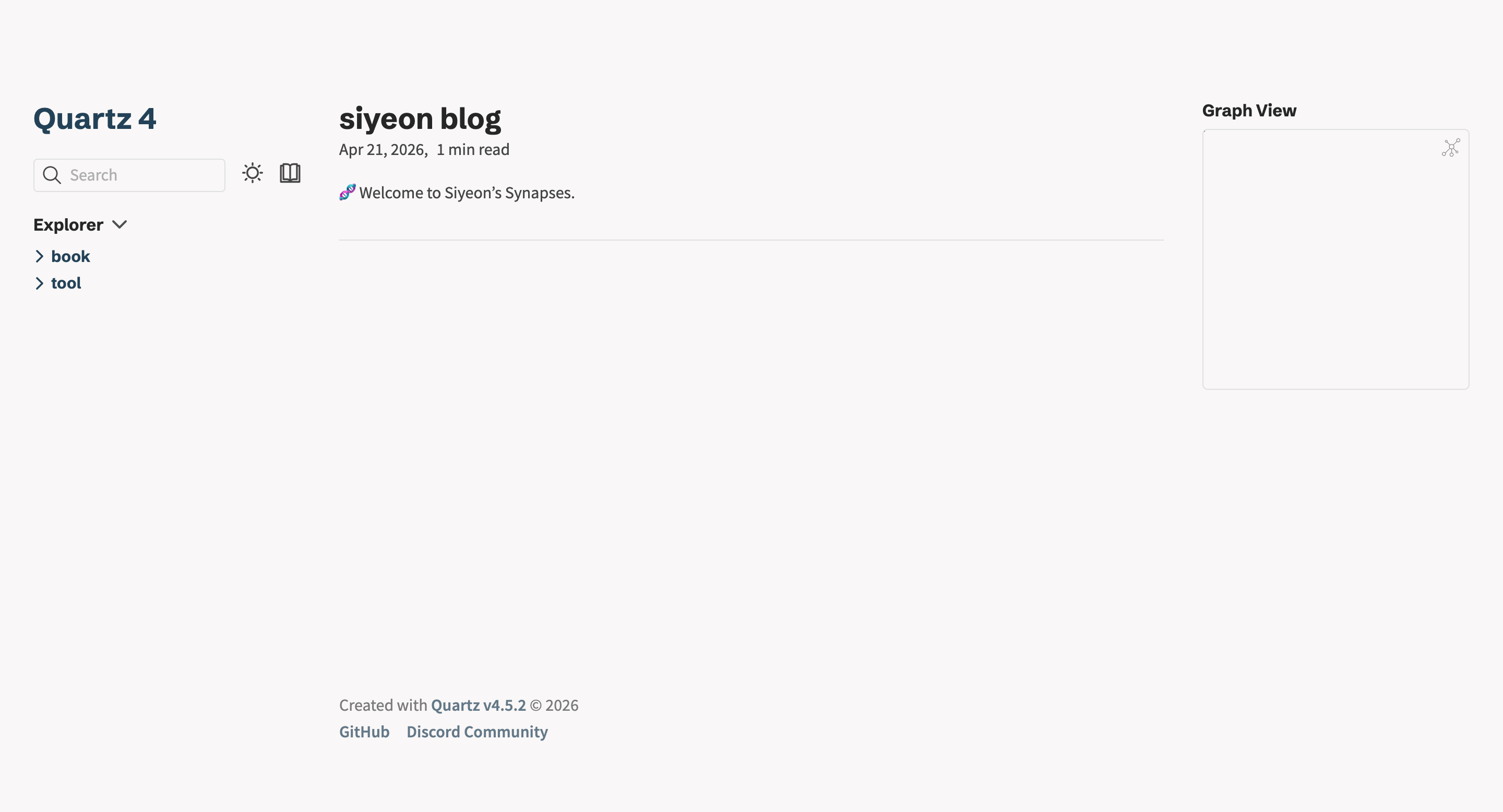
메인 페이지에 최근 작성한 글 목록이 보여지도록 하고 싶다. recent notes를 참고해보자.1
1. 레이아웃 설정 뜯어보기
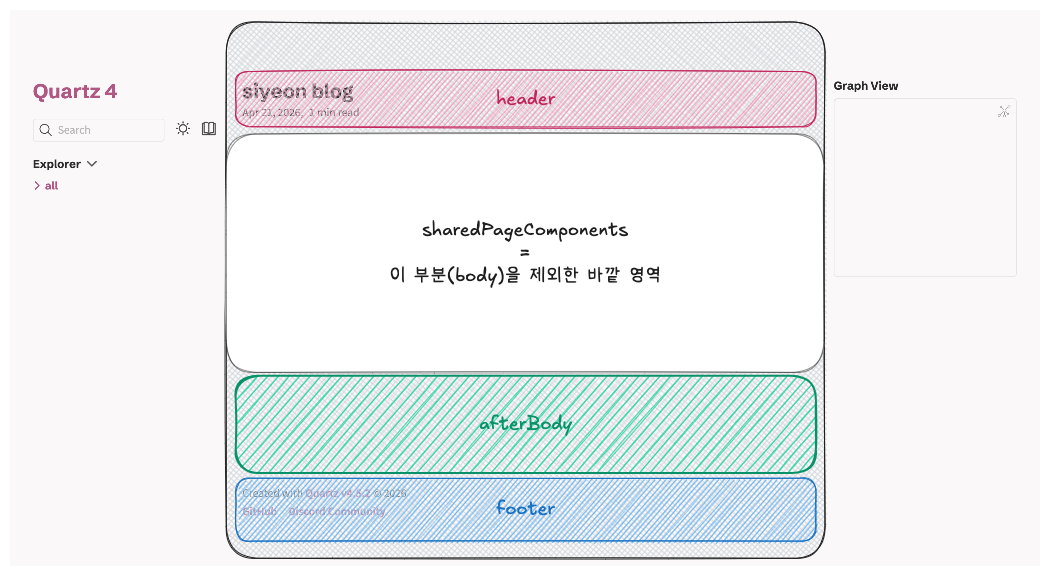
루트 폴더 바로 하위의 quartz.layout.ts 파일은 Quartz 페이지의 구조를 결정한다. 해당 파일을 보면 세가지 객체가 존재하며 각 항목은 다음과 같은 설정을 담당한다.
sharedPageComponents: 블로그의 모든 페이지를 나타내는 컴포넌트2- 어느 위치에 있든 상관 없이 항상 고정적으로 보여지는 레이아웃 부분
- header, afterBody, footer(현재는 quartz의 github와 디스코드 커뮤니티가 링크됨) 등을 설정
defaultContentPageLayout: 개별 페이지 (.md파일 하나하나)를 읽는 화면 구성 설정3beforeBody,left,right3가지 섹션으로 나눠짐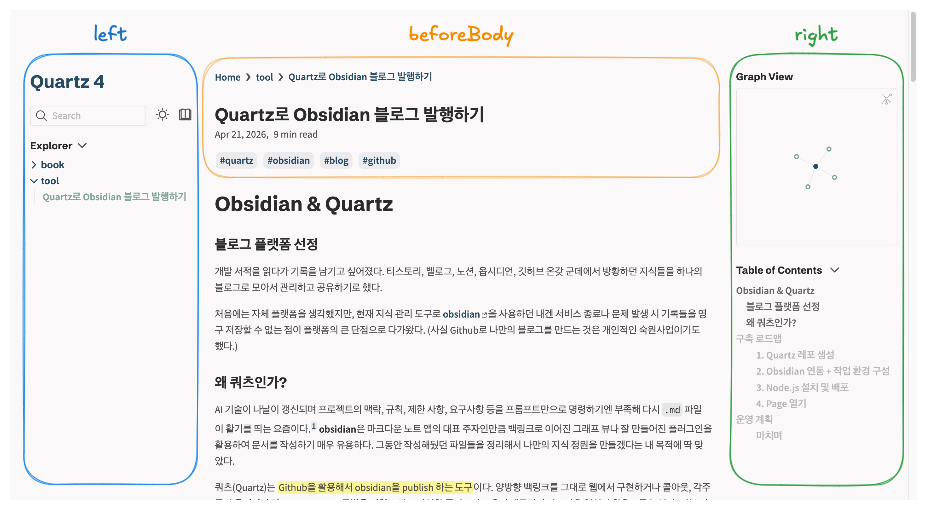
defaultListPageLayout: 특정 태그나 폴더를 클릭했을 때 파일 목록을 보여주는 페이지 설정4- 마찬가지로
beforeBody,left,right3가지 섹션으로 나눠짐 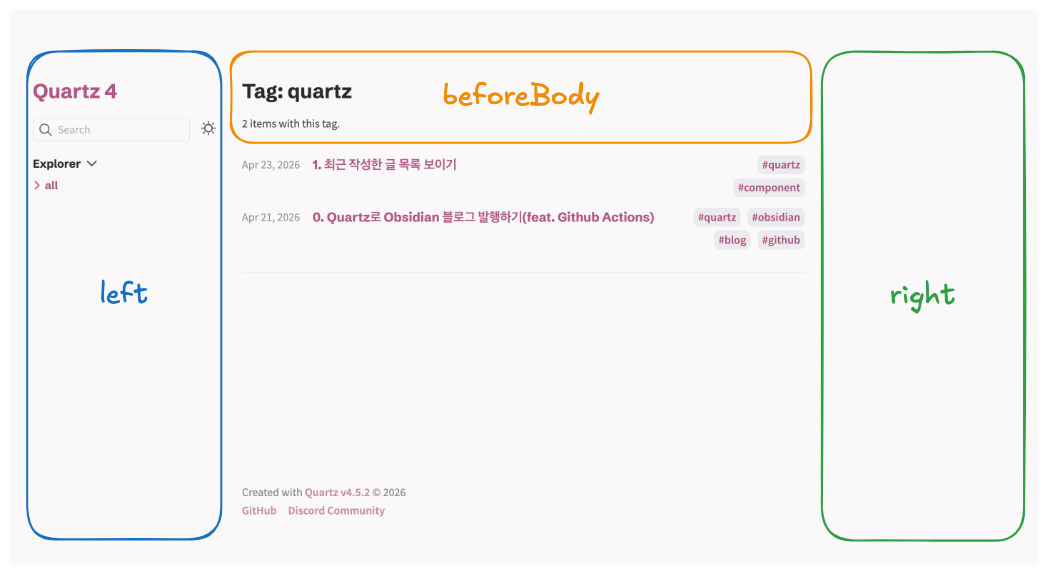
- 마찬가지로
2. 최근 글 커스텀 & 적용
최근 글을 보여주는 컴포넌트는 Component.RecentNotes()를 사용하면 되고 내부에서 사용할 수 있는 옵션들은 이런 것들이 있다.
title: 최근 글 목록의 소제목limit: 보여지는 글의 개수showTags: 게시물의 태그 표시(default: true)linkToMore: ‘더 보기’ 링크 표시(이 필드에는 존재하는 전체 경로를 입력해야 함)filter: 특정 태그나 폴더의 글만 필터링함sort: 기본적으로 Quartz는 날짜 오름차순으로 정렬하나, 함수를 이용해 정렬 방식 커스텀 가능
Warning
문제 상황
linkToMore설정에서 나는 ‘더 보기’ 버튼을 누르면 해당 페이지에서 글들만 새로 랜더링 되는 줄 알았으나, 실제로는 설정한 경로로 이동하여 더 보여주는 원리였다..
현재 나는 전체 포스트를 모아서 목록으로 볼 수 있는 페이지가 없었기 때문에 메인 화면에서 전체 글을 다 보여줄까 고민하다가 다른 방법을 몇가지 생각했다.
- 제공해주는 Tag Index 사용하기
블로그 도메인/tags→ 태그가 여러개라면 중복 출력됨- 경로를 루트로 설정해버리기 → 하지만 이 방법은 메인 화면으로 돌아오기 때문에 결국 돌고 돎..
- 모든 글을 한 개의 폴더에 넣어서 그 안에서 폴더링 하기
결정
결론적으로 Recent Notes 기능은 최신 글을 보여주는 것이라고 생각했기 때문에 전체 글을 보여주는 링크도 하나 있어야한다고 생각했고,
index.md와 첨부파일을 담은assets폴더를 제외한 모든 순수 게시글들의 폴더를all폴더에 담기로 결정했다.
나는 모든 위치에서 글 마지막 부분에 나타나도록 설정하고 싶으므로 sharedPageComponents의 afterBody에 원하는 옵션을 담은 Component.RecentNotes를 추가해준다.
// quartz.layout.ts

export const sharedPageComponents: SharedLayout = {
  head: Component.Head(),
  header: [],
  afterBody: [
    Component.RecentNotes({
      title: "최근에 작성한 글",
      limit: 2,
      linkToMore: "all/",
    }),
  ],
  footer: Component.Footer({
    links: {
      [`Quartz v${version}`]: "https://quartz.jzhao.xyz/",
      GitHub: "https://github.com/jackyzha0/quartz",
      "Discord Community": "https://discord.gg/cRFFHYye7t",
    },
  }),
}
3. 전체 글 페이지
블로그 도메인/all로 들어가보니 폴더 구조만 나오고 전체 글은 보이지 않았다. all/ 경로로 접속했을 때Quartz가 자동으로 Folder Index 기능을 실행해서 하위 폴더(book, my quartz)만 리스트로 보여주고 있다.
FolderContent 컴포넌트에서 직접 수정하여 커스텀한다.
- (기존) 폴더를 하나의 아이템으로 추가 → (신규) 폴더 안의 글들을 펼쳐서 추가
- 자세한 구현 내용은 깃허브 참고
// quartz/components/pages/FolderContent.tsx

const flattenChildren = (nodes: NonNullable<typeof folder>["children"]): QuartzPluginData[] =>
    nodes.flatMap((node) => {
      if (node.data) return [node.data]
      if (node.isFolder && options.showSubfolders) return flattenChildren(node.children)
      return []
    })

const allPagesInFolder: QuartzPluginData[] = flattenChildren(folder.children)
4. 추가 설정
1. 구분선
설정 후 로컬에서 돌려보니 목록에 게시물들이 서로 너무 붙어있어서 구분선을 추가했다.
// quartz/components/styles/recentNotes.scss

& > li.recent-li {
  margin: 0;
  padding: 1rem 0 1.2rem 0;

  &:not(:last-child)::after {
    content: "";
    display: block;
    width: 100%;
    height: 1px;
    background-color: var(--lightgray);
    margin-top: 1rem;
  }
}
2. 메인 색상 변경
quartz.config.ts 파일에서 secondary 항목을 변경해주면 된다.
...
colors: {
  lightMode: {
    light: "#faf8f8",
    lightgray: "#e5e5e5",
    gray: "#b8b8b8",
    darkgray: "#4e4e4e",
    dark: "#2b2b2b",
    secondary: "#B05783",  // custom
    tertiary: "#84a59d",
    highlight: "rgba(143, 159, 169, 0.15)",
    textHighlight: "#fff23688",
  },
  darkMode: {
    light: "#161618",
    lightgray: "#393639",
    gray: "#646464",
    darkgray: "#d4d4d4",
    dark: "#ebebec",
    secondary: "#7b97aa",
    tertiary: "#84a59d",
    highlight: "rgba(143, 159, 169, 0.15)",
    textHighlight: "#b3aa0288",
  },
},
...
3. footer 링크 수정
sharedPageComponents의 Footer 부분도 원하는 대로 수정해주면 된다.
단, Created with ... 부분의 텍스트를 수정하려면 아예 Footer 컴포넌트 자체를 수정해주어야 한다.
// quartz/components/Footer.tsx

return (
    <footer class={`${displayClass ?? ""}`}>
      {/*<p>*/}
      {/*  {i18n(cfg.locale).components.footer.createdWith}{" "}*/}
      {/*  <a href="https://quartz.jzhao.xyz/">Quartz v{version}</a> © {year}*/}
      {/*</p>*/}
        <p>
            Powered by <a href="https://github.com/ghsyn/blog">Siyeon Kim</a> © {year}
        </p>
      <ul>        {Object.entries(links).map(([text, link]) => (
          <li>
            | <a href={link}>{text}</a>
          </li>
        ))}
      </ul>
    </footer>
  )
}
관련 링크
- quartz 공식문서: https://quartz.jzhao.xyz/
- obsidian 공식문서: https://obsidian.md/help/
Footnotes
-
해당 글은 https://quartz.jzhao.xyz/features/recent-notes 에서도 확인 가능하다. ↩
-
// components shared across all pages ↩
-
// components for pages that display a single page (e.g. a single note) ↩
-
// components for pages that display lists of pages (e.g. tags or folders) ↩